
Business and WhatsApp automation
Order confirmation, delivery updates, invoices and follow-ups on WhatsApp, with a run log and error handling.
Sample data
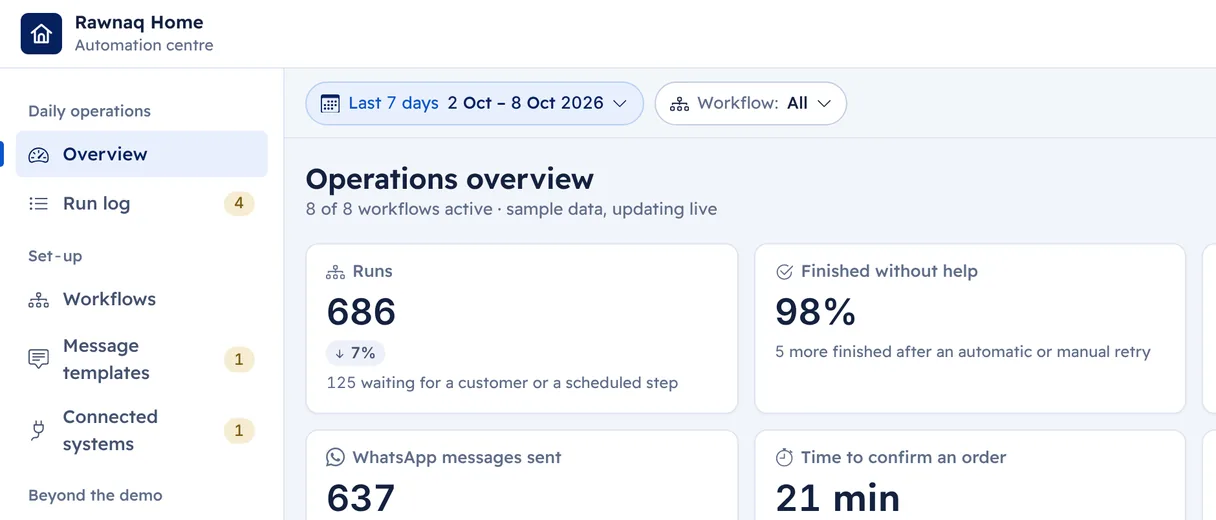
Try this
Place a test order and play the customer: a WhatsApp message arrives on a phone, you answer it, and the order continues its path.
Notice: Each step shows what happened to the sample order.
Open “Run log”, then “Need a person”: correct an incomplete number or choose another warehouse and retry.
Notice: Failures show where intervention is needed.
Open a workflow and run a test, then try a customer without WhatsApp and see where the workflow stops and why.
Notice: The test simulates execution without sending real messages.
As an administrator, change a waiting time in a step and publish the new version, then try to choose a template that is not approved yet.
Notice: Publishing and template approval are separate steps.
Open “Demo controls” to switch role, try a slow or lost connection, or start with empty data.
Notice: Scenarios expose workflow limits and permissions.
All companies and figures in the demos are fictional and illustrative.
Scope and implementation details
The problem it solves
The problem it solves
In many companies, staff move data by hand between the online store, WhatsApp, spreadsheets and the accounting system: they copy the order, message the customer to confirm it, enter the invoice, then chase the payment.
Every manual copy is a chance for a mistake or a delay, and the customer waits for a message nobody knows was never sent. When the person in charge is away, the whole chain stops.
Signs you may recognise
- Cash-on-delivery orders are shipped and come back because nobody confirmed them with the customer.
- Customers ask on WhatsApp “where is my order?” because nobody told them.
- The same invoice is entered in two systems, and the numbers do not match.
- Payment reminders go out when someone remembers, not when they are due.
- Nobody knows something failed until a customer complains.
What makes it hard
What makes it hard
Easy automation works on the day of the demo and then fails silently. Useful automation has to solve these four problems.
Failures must be visible
When WhatsApp refuses a message or the ERP is slow, someone must see it at once, with a clear reason and what to do, instead of the order getting lost.
Platform rules
WhatsApp messages that start a conversation need approved templates, have sending limits and suitable hours. Ignoring them gets the account blocked.
Handling the unexpected
A customer who does not answer, an incomplete number, an item out of stock, a new status code from the delivery company: each case needs a path written in advance.
Changing without breaking
Changing a message or a waiting time has to be tested, reviewed and reversible, without stopping what works now.
The solution
The solution
Workflows written around the way you work, connecting the systems you use today, with an operations screen where your team sees every run and what needs a person.
- Order confirmation on WhatsApp with one tap before the order is prepared, with one reminder and then a handover to the call team.
- Delivery updates to the customer from the shipment status itself, and a new slot after a missed delivery.
- Website and WhatsApp inquiries become leads with an owner, with an escalation when the first answer is late.
- From a won deal to the sales order and invoice in the ERP without typing twice, then a payment reminder on time.
- A run log of every run and its steps, automatic retries for what fixes itself, and one screen for what needs a person.
- WhatsApp templates in Arabic and English, quiet hours and opt-outs respected.
Modules in this demonstration
Modules in this demonstration
Each module can be included in your project or left out.
Operations overview
Today’s runs, what finished on its own, what needs a person, live activity and the state of connected systems.
Workflows
Eight workflows, each with its diagram, a test on sample data and versions you can return to.
Run log
Every run with its steps and times, failures with their cause and what to do, retries and resolutions.
WhatsApp templates
Templates in Arabic and English with their approval status, and how a rejected one is corrected and resubmitted.
Connected systems
Store, CRM, ERP, WhatsApp, delivery and e-mail, with permissions, errors and key renewal.
Roles
Administrators change and publish, operations officers fix, view-only users see masked data.
Simplified architecture
Simplified architecture
How an event moves from one system to the next until it reaches a customer or a member of staff. The exact layers depend on what you use today.
Events
- A new order or payment in the store
- An inquiry from the website or WhatsApp
- A shipment update or a won deal
Automation engine
- Workflows, conditions and waits
- Retries and quiet hours
- A log of every run
Connected systems
- CRM and an ERP such as Odoo
- WhatsApp Business Platform and e-mail
- Delivery company and dashboard
Your team
- Operations overview and alerts
- Fixing what needs a person
- Reports and a daily summary
The data in this demonstration is generated for testing only, so it is not connected to any real system and no message is sent.
Expected impact
Expected impact
What changes in daily work when the automation runs. These are the practical changes the solution is built for, not guaranteed business results.
- No order prepared without a confirmation
- Cash-on-delivery orders are confirmed with the customer before they reach the warehouse.
- Customers know without asking
- The confirmation, the delivery time and the delivery reach them when they happen.
- Entered once
- What is recorded in one system reaches the others without copying by hand.
- Failures do not disappear
- Everything that fails shows up with its cause and what to do; what fixes itself is retried automatically.
Results depend on your systems, your data and the rules of the platforms you use. We commit to the deliverables, the quality checks and the dates written in the proposal.
Scope of a project like this
Scope of a project like this
The demonstration shows eight workflows. A first project usually starts with one or two and is defined in a written proposal before work starts.
In the core scope
- One workflow written around the way you work, such as order confirmation on WhatsApp
- Connection between two systems, such as your store and WhatsApp
- Message templates in Arabic and English, submitted for approval
- Retries, quiet hours and opt-outs
- A run log and an alert when something needs a person
- Documentation of the workflow and a handover session
Added when you need it
- More workflows, such as delivery updates and payment reminders
- Connection to an ERP such as Odoo, or an accounting system
- A full operations screen and several roles
- A daily summary and reports
- A monthly plan for monitoring and changes
What we need from you
- A WhatsApp Business Platform account in your company’s name, with its own number
- Access to your store or system through a user created for the automation
- Approval of the message texts
- A review at each milestone
WhatsApp platform fees, hosting and external subscriptions are paid to their providers and opened in your name. Anything outside the written scope is priced before it is executed.
How it starts
A single simple workflow starts from the price shown after a free call and a written offer. Automation requiring custom software, enterprise integrations or ERP needs a paid diagnostic followed by a custom implementation quote.
- Duration
- 7–10 days
- Price
- Starting from 2,500 SAR